
Project: Encrypted Communication
Objectives
In this project, you will gain experience using cryptographic primitives to implement encrypted communication between a client and a server.
We are providing you with a server and your job will be to write a client to communicate with it.
Project Setup
Download the handout for this assignment and put it in a folder. The handout includes a Dev Container, so When you open this folder in Visual Studio Code, it should ask you to reopen it in a container.
Using a Linux container will enable you to run the binary for the server, which has been compiled for Linux.
Client-Server Protocol
The client and server communicate using the following protocol:
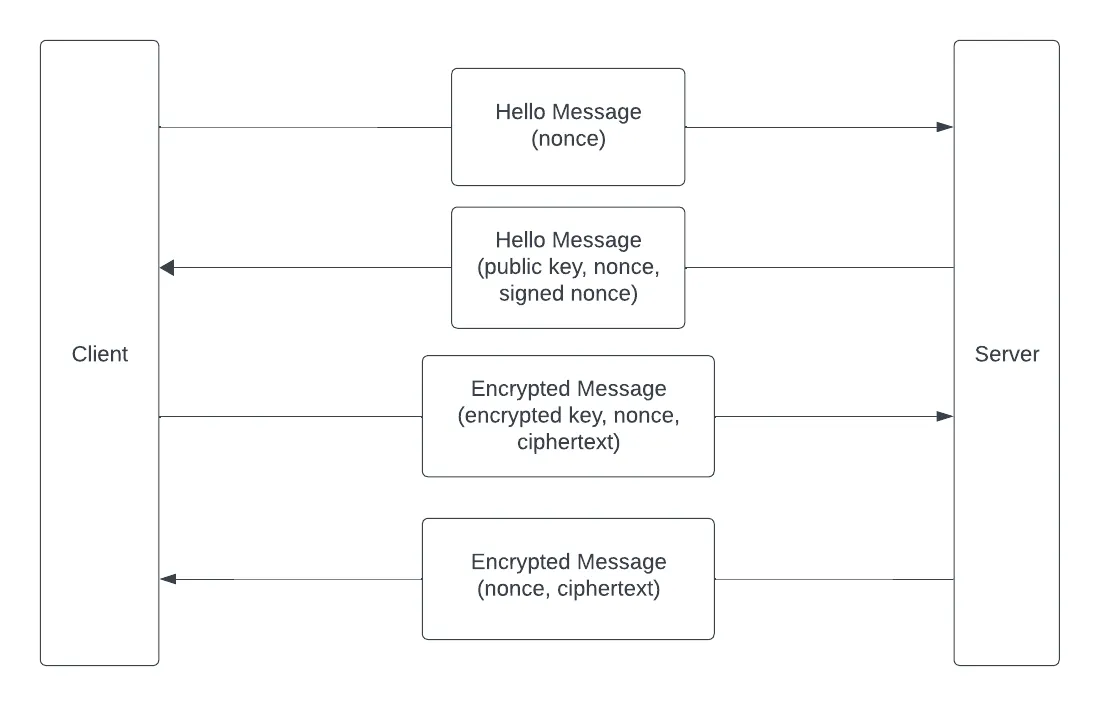
- The client sends the server a Hello Message containing a nonce
- The server responds with a Hello Message that includes its RSA public key (in PEM format), the nonce, and a signed version of the nonce
- The client verifies the signature and, if it is valid, accepts the server’s public key
- For every message the client sends to the server it:
- Creates a new symmetric key K and a nonce
- Encrypts the key K with the server’s public key
- Encrypts the message with K
- Sends the server an Encrypted Message message that includes the encrypted key, the nonce, and the encrypted message
- The server responds to an Encrypted Message with a Server Response that
includes:
- a new nonce
- the message, encrypted with the same key but the new nonce
- The client decrypts and prints each Encrypted Message the server sends it
Implementing the Client
You should write your code in the provided src/main.rs:
use std::net::TcpStream;
mod messages;use messages::{EncryptedMessage, HelloMessage, ServerResponse};
fn main() {    let mut stream = match TcpStream::connect("127.0.0.1:2222") {        Ok(stream) => stream,        Err(_e) => {            println!("Could not connect to server. Check that it is running");            return ();        }    };    println!("Connected to server");}
This code connects to the server and then exits. You should add code so that the client:
- sends a Hello Message
- parses the server response
- loops
- reads some text from the terminal
- if the text is “exit”, break from the loop
- otherwise, send an Encrypted Message
- parse the Server Response
A sample session should look like this:
./binaries/server# note, quit the server with control-ccargo run clientConnected to serverHello exchangedEnter message: this is a test messageReceived: this is a test messageEnter message: lovely to see this workingReceived: lovely to see this workingEnter message: exitNote, you will need to open two terminals for this project. If the server doesn’t have the proper execution permissions, you can add them:
chmod u+x ./binaries/serverMessages
We have provided a src/messages.rs module that provides structs for the
different message types as well as methods that convert these structs to/from
JSON. You should be able to use this module without making any changes to it.
For example, here is a Hello Message:
#[derive(Serialize, Deserialize)]pub struct HelloMessage {    pub signed_message: Vec<u8>,    pub pub_key: String,    pub nonce: [u8; 32],}
impl HelloMessage {    pub fn to_json(&self) -> Result<String, serde_json::Error> {        serde_json::to_string(self)    }
    pub fn from_json(message: String) -> Result<HelloMessage, serde_json::Error> {        serde_json::from_str(&message)    }}
You can create an initial Hello Message with:
// assume you have created the noncelet hello = HelloMessage { signed_message: vec![], pub_key: "".to_string(), nonce,};and convert it to json:
let json = hello.to_json()?;Likewise when you receive a message as bytes, you can convert it into a JSON
string and then convert that JSON string into a message, e.g. using
HelloMessage::from_json().
TCP Stream
The client and server use a TCP socket to send messages. Using the stream
TCPStream object in the provided code, you can use the following methods.
To write to the TCP stream:
// json should be the result of one of the to_json() methods abovestream.write_all(json.as_bytes());To read from the TCP stream:
// we assume that all messages are shorter than 4096 bytes and// will be read in one call to read()let mut buffer = [0; 4096];let bytes_read = stream.read(&mut buffer)?;// an example of how to convert the buffer to a JSON string// you can do something similar for other message typeslet server_hello_json = str::from_utf8(&buffer[..bytes_read]).expect("Server hello not in UTF8");See the following for additional documentation:
Rust Crypto
For the Rust crypto, use:
- Rsa — the client will need to convert the
public key from the PEM format it receives, derive the verifying key from the
public key, verify the
PKCS#1 v1.5signature on the nonce, and encrypt the symmetric key withPkcs1v15Encryptpadding - PKCS #1 v1.5 Signature -
the client will need to convert a signature in bytes to a Signature struct,
see the
try_from()method - AES GCM — the client will need to generate a symmetric key, generate a nonce, and encrypt plaintext
You can see the Rust Cryptography examples we covered in class as examples of how to use these libraries. (This links to an older version of the examples, from 2024, that uses the same library versions as this project. The updated project uses the current version.)
Rust Tips
(1) This code uses a nonce that is 32 bytes long. You can generate this with:
let mut nonce = [0u8; 32];thread_rng().fill_bytes(&mut nonce);(2) To create a verifying key, you can use:
VerifyingKey::<Sha256>::from_public_key_pem()(3) To import a nonce from the server, you can use:
let nonce = Nonce::from_slice(&nonce_vec[..]);Grading Rubric
- Total (100 points)
- 20 points for sending the server a valid Hello Message
- 20 points for sending the server a valid Encrypted Message
- 20 points for sending the server a symmetric encryption key that is encrypted with its public key.
- 20 points for sending the server a message that is correctly encrypted with the symmetric key and nonce
- 20 points for using a new encryption key and nonce with every Encrypted Message
Submission
Use the tar command and your BYU netID to compress your files:
tar --exclude=target --exclude=.git -czvf byuNetID.tar directorySubmit your tar file on Canvas.