
Password authentication
Questions on the readings
The readings today are from Computer Security and the Internet, Chapter 3, sections 3.0 - 3.2, 3.6, 3.8.
SEE ALSO: This world of Ours - James Mickens
Password authentication
-
Never store passwords as cleartext — if your password database is stolen, the attacker now knows all passwords and can try them on other sites
- instead store hash of the password, using a cryptographic hash function
-
basic operation
- generate a random salt
- generate a hash of the password and salt hash = H(password, salt)
- store username, salt, hash
- note, often the hash includes an encoded salt to simplify storage
Attacks on passwords
-
offline vs online attacks
- offline — steal a password database (username, salt, hash), try to crack them, usually using a GPU
- online — guess passwords on a live system
-
rainbow table attack
- user a list of potential passwords (possibly from a breach list)
- pre-compute hashes for a well-known hashing algorithm
- steal a password database
- compare pre-computed hashes to the password database
- fast attack since precomputation used
- foiled by use of salt, which is why salting is so important
-
dictionary attack
- use a list of potential passwords (possibly from a breach list)
- for each password, compute the hash for each user, using their salt
- look for a match
- computation must be done separately for each user since they each have a different, randoms salt
- no precomputation can be done since salts not known in advance
-
password capture
- shoulder-surfing
- keyloggers
- malware
- phishing
- social engineering
-
password interface bypass
-
defeating recovery mechanisms
Password policies
-
policies recommended by NIST guidelines, see 3.1.1.2
- minimum length of 8, should use minimum length of 15
- accept all printable characters
- check registered passwords against blocklists
- rate limit password guessing
- could also use a pepper — like a salt, but stored separately, e.g. in an HSM (hardware security module)
-
policies no longer recommended by NIST, see Appendix A for helpful details
- password complexity requirements (users will just make “Password1!”)
- password should not arbitarily expire — only expire if evidence of a compromise exists
- hints that are available to an unauthenticated user
Length and complexity requirements beyond those recommended here significantly increase the difficulty of using passwords and increase user frustration. As a result, users often work around these restrictions counterproductively. Other mitigations (e.g., blocklists, secure hashed storage, machine-generated random passwords, and rate limiting) are more effective at preventing modern brute-force attacks, so no additional complexity requirements are imposed.
Notice that this shifts the burden from the user to the system
Recommended hashing algorithsm
-
Argon2id
- Argon2 — resists GPU cracking attacks (because it slows them down)
- Argon2i — resists side-channel attacks
- Argon2id — combines them both
-
scrypt if Argon2id is not available
-
bcrypt only for legacy systems
-
PBKDF2 for FIPS-140 compliance (cryptographic modules)
Entropy
- user chosen passwords are not random
- entropy is often misused for passwords, leading to poor conclusions about password security
Bad example (taken from an unnamed website)
E = L×log2(R)
- E is your password entropy
- R is the possible range of character types in your password
- L is the number of characters in your password (its length)
| Example | Character Range | Password Length | Calculation | Bits of Entropy |
|---|---|---|---|---|
| Bankruptcies | 52 | 12 chars. | E = 12 x 5.7 | 68.4 |
| 1Bankruptcies2 | 62 | 14 chars. | E = 14 x 5.95 | 83.3 |
| 1Bankruptcies2&% | 94 | 16 chars. | E = 16 x 6.55 | 104.8 |
- Generally, a strong or high-entropy password scores at least 75 bits. Anything measuring fewer than 72 bits is reasonably easy for a machine to crack.
Why this approach is misleading
- assumes attacker goes through every possible password, methodically
- in reality, attackers try high probability passwords first
- assumes users choose passwords randomly from the entire password space (e.g. c1Bkanpurtis2&e% is just as probably as 1Bankruptcies2&%)
- in reality, an attacker can use a dictionary, add in capitals, numbers, and digits, and get to this guess much faster than the calculated bits of entropy would imply
- all the shown passwords are relatively easy to guess
Account recovery
Never store passwords in the clear so that you can offer “password recovery”
-
recovery link or code sent via email
- must inclue some randomized code in the link to avoid replay attacks
- difficulty: compromised email account can be used to take over other accounts
-
one-time code sent via SMS
- difficulty: phones subject to targeted SIM cloning attacks
-
challenge questions
- difficulty: users may forget answers, answers may be easily guessed, likely stored in plaintext so can be leaked
- not recommended
Password managers
-
features
- store passwords
- generate random passwords
- autofill passwords
- sync passwords among your devices
-
protected by a master password
-
security and risks
- single point of failure
- master password capture, online guessing, or offline guessing
- risk if password manager fails
Lastpass
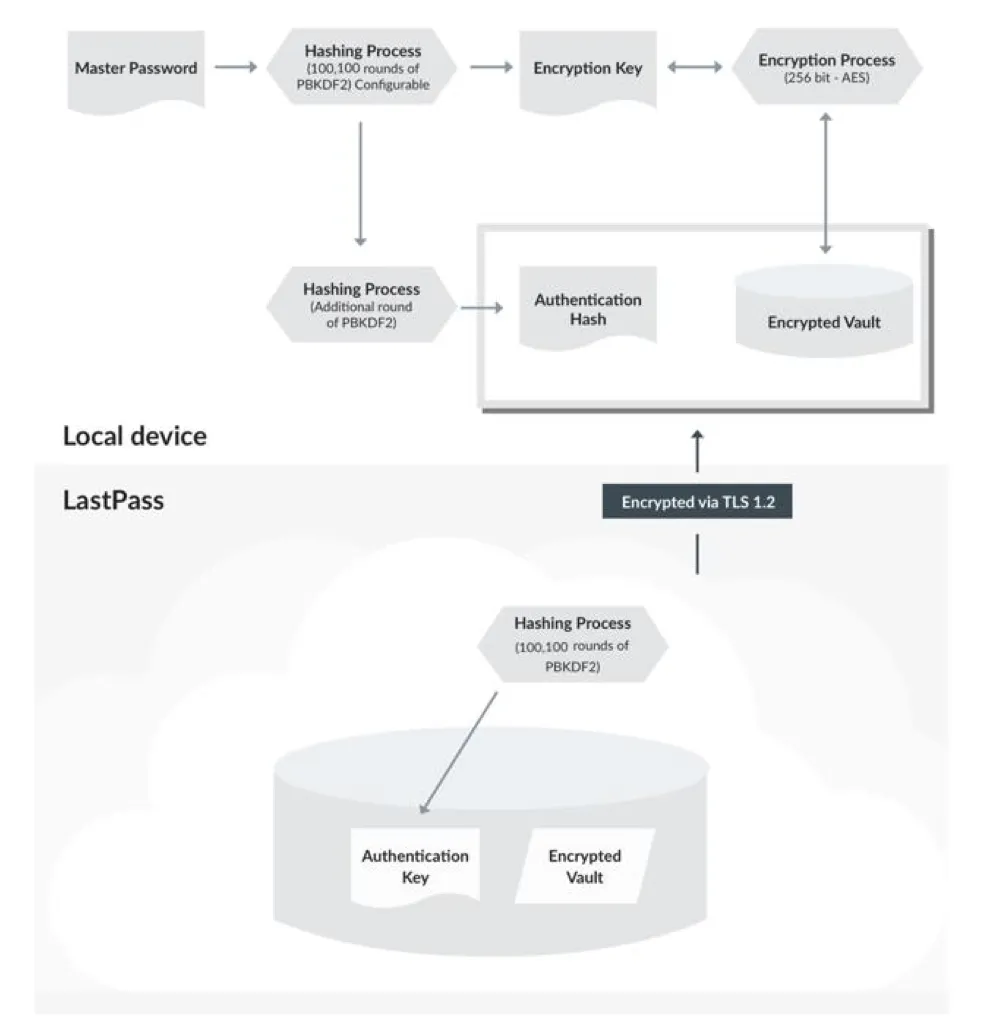
-
puts your master password through a key derivation function, PBKDF2, for many rounds
- this results in an encryption key that is used to encrypt the password vault, using AES
- one more round of the KDF provides the authentication hash
-
key point: if an attacker steals your vault (which has happened with LastPass), and you used a weak master password, they can brute force that password to recover your vault
-
see LastPass Technical whitepaper for more details
1Password
-
uses an additional secret key that is mixed with the password
- k = PBKDF2(password, secret_key, 650000)
- to decrypt your vault, you need (a) password, (b) secret key, (c) encrypted vault
- prevents a brute-force attack on your vault if it is stolen
-
this means you need to store the secret key safely and then enter it to authorize a new device to access your vault
- 1Password recommends printing and storing it somewhere (they call this the Emergency Kit)
-
see 1Password Security Design for more details
Extra reading
Password policies and system administrators
- see An Administrator’s Guide to Internet Password Research — note, predated NIST by 6 years
Password alternatives
- The Quest to Replace Passwords
- considers security, usability, and deployability
Not only does no known scheme come close to providing all desired benefits: none even retains the full set of benefits that legacy passwords already provide. In particular, there is a wide range from schemes offering minor security benefits beyond legacy passwords, to those offering significant security benefits in return for being more costly to deploy or more difficult to use. We conclude that many academic proposals have failed to gain traction because researchers rarely consider a sufficiently wide range of real-world
Account Recovery
- see Email as a Master Key: Analyzing Account Recovery in the Wild, Li, Wang, and Sun, IEEE INFOCOM 2018
Account recovery (usually through a password reset) on many websites has mainly relied on accessibility to a registered email due to its favorable deployability and usability. However, it makes a user’s online accounts vulnerable to a single point of failure when the registered email account is compromised. While previous research focuses on strengthening user passwords, the security risk imposed by email-based account recovery has not yet been well studied. In this paper, we investigate the possibility of mounting an email-based account recovery attack. Specifically, we examine the account authentication and recovery protocols in 239 traffic-heavy websites, confirming that most of them use emails for account recovery. We further scrutinize the security policy of major email service providers and show that a significant portion of them take no or marginal effort to protect user email accounts, leaving compromised email accounts readily available for mounting account recovery attacks. Then, we conduct case studies to assess potential losses caused by such attacks. Finally, we propose a lightweight email security enhancement called Secure Email Account Recovery (SEAR) to defend against account recovery attacks as an extra layer of protection to account recovery emails.
- see Secrets, Lies, and Account Recovery: Lessons from the Use of Personal Knowledge Questions at Google
We examine the first large real-world data set on personal knowledge question’s security and memorability from their deployment at Google. Our analysis confirms that secret questions generally offer a security level that is far lower than user-chosen passwords. It turns out to be even lower than proxies such as the real distribution of surnames in the population would indicate. Surprisingly, we found that a significant cause of this insecurity is that users often don’t answer truthfully. A user survey we conducted revealed that a significant fraction of users (37%) who admitted to providing fake answers did so in an attempt to make them “harder to guess” although on aggregate this behavior had the opposite effect as people “harden” their answers in the same and predictable way. On the usability side, we show that secret answers have surprisingly poor memorability despite the assumption that their reliability motivates their continued deployment. From millions of account recovery attempts we observed a significant fraction of users (e.g 40% of our English-speaking US users) were unable to recall their answers when needed. This is lower than the success rate of alternative recovery mechanisms such as SMS reset codes (over 80%). Comparing question strength and memorability reveals that the questions that are potentially the most secure (e.g what is your first phone number) are also the ones with the worst memorability. We conclude that it appears next to impossible to find secret questions that are both secure and memorable. Secret questions continue have some use when combined with other signals, but they should not be used alone and best practice should favor more reliable alternatives.
Password managers
-
Why Do People Adopt, or Reject, Smartphone Password Managers?
- lack of awareness
- belief that current practices are secure
- difficulty using or understanding them
- worry about lack of control
-
Why people (don’t) use password managers effectively
- trade-offs between security and convenience (e.g. prioritizing random passwords on financial accounts)
- users of built-in password managers more motivated by convenience (and have more re-used passwords), users of separate password managers driven by security
-
Why Users (Don’t) Use Password Managers at a Large Educational Institution
- 77% use a password managers, 60% using built-in (browser based), 18% using third party
- 77% reuse passwords across accounts, but those using third party password managers are much less likely to do that
- ease of use more important than security
- third-party password manager users are significantly more likely to use the password manager to generate random passwords
-
- identifies some weaknesses in password managers
-
- many using them for convenience, not sucurity
- users add credentials as they visit websites, and prioritize the sites they add
- users update passwords only when they are considreed insecure
- distrust of password managers, so some users don’t store important passwords there